
How to Verify a User is Enabled to see Tank Readings
- Regarding setups, there are really just a couple of high-level steps required:
- The customer must be assigned to the site
- The user must have permission to view
-
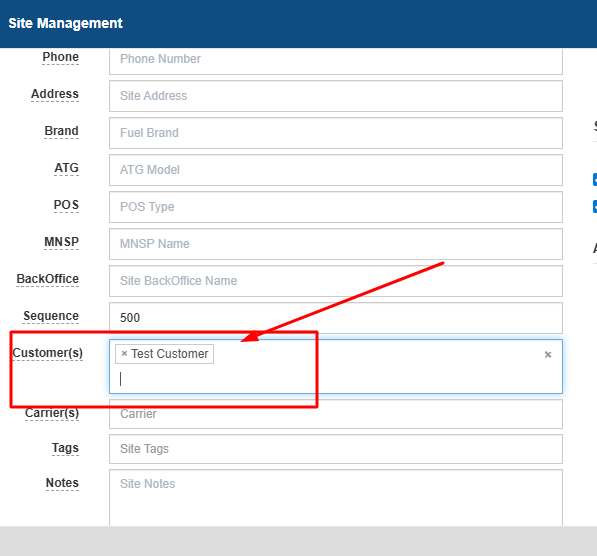
For customer to site assignment, The most direct way to link a customer to an inventory site is to go to Inventory > Site Maintenance. From here, simply find the site and click Options > Edit Site and you can assign the customer directly to the site. See below.
-
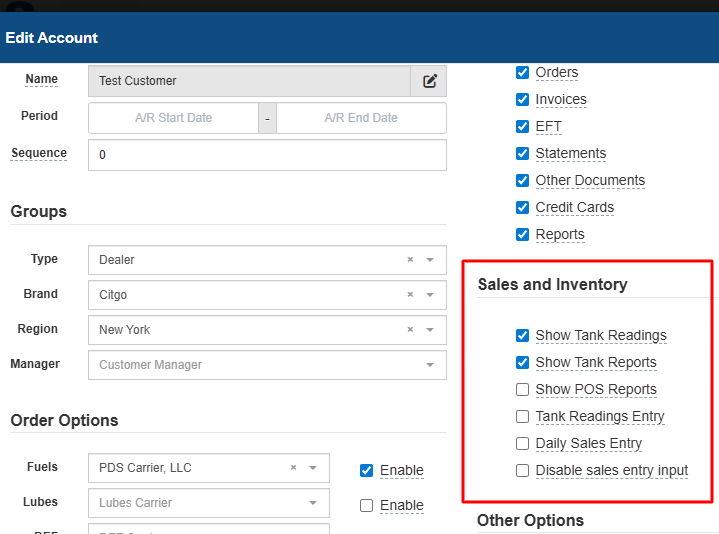
For the user setup,Go to Users > Customers > User List, find the user and click Options > Edit User. Go to the Accounts tab, click Options > Edit Account and ensure the Show Tank Readings option is enabled.
- There are a few steps for troubleshooting from a user's interface.
- If the user can not see the Inventory tab or menu, then it is a user permission issue
-
If the user can see the Inventory menu, but not any sites or tank readings, then it is likely a configuration issue.
